

Table of Contents (TOC)
Introduction: Why AWS AI Tools Matter
Key AWS AI Tools Developers Should Know
How AWS AI Works: Simple Explanation
Beginner-Friendly Use Cases of AWS AI
Intermediate Projects for Mid-Level Developers
Integrating AWS AI Tools in Real Applications
Best Practices: Ethics, Cost, and Optimization
Career Benefits of Learning AWS AI Tools
Step-by-Step Learning Roadmap for AWS Developers
FAQs: AWS AI Tools for Developers
Conclusion: Why AWS AI Is Essential
Introduction
Why AWS AI Tools Matter
Artificial intelligence is now central to modern software development. For developers, integrating AI into applications can mean smarter automation, better user experiences, and innovative solutions. AWS AI tools make this practical by providing ready-to-use services, pre-trained models, and managed infrastructure.
Whether you are a beginner or a mid-level developer, these tools allow you to build intelligent features like chatbots, recommendation engines, predictive analytics, and more—without needing to master AI algorithms from scratch. Understanding and using AWS AI tools is no longer optional for developers; it’s becoming a career-essential skill.
Why AWS Is Investing Heavily in AI for Developers
The demand for AI-powered applications is increasing across industries such as healthcare, finance, education, and e-commerce. Businesses want faster insights, better automation, and more personalized user experiences. AWS is investing in AI because cloud-based AI enables organizations to adopt intelligence without building expensive infrastructure.
For developers, this means AI is no longer limited to specialists. AWS integrates AI into its cloud ecosystem so developers can access advanced capabilities through simple APIs. This approach allows AWS Developers to build intelligent features using familiar tools and workflows, making AI development more approachable and scalable.
Understanding AWS AI Tools in Simple Terms
AWS AI tools are managed services that perform specific intelligent tasks such as understanding text, recognizing images, or generating responses. Instead of creating machine learning models from scratch, developers can call these services using APIs.
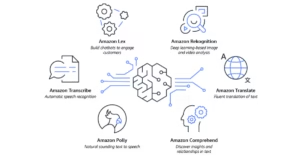
Here are the most practical AWS AI tools for developers:
Amazon SageMaker: Build, train, and deploy custom ML models with ease.
Amazon Rekognition: Analyze images and video to detect objects, faces, or inappropriate content.
Amazon Comprehend: NLP tool to understand text, analyze sentiment, and extract insights.
Amazon Lex: Build chatbots and voice assistants powered by AI.
Amazon Polly: Convert text to realistic speech for applications.
Amazon Forecast: Predict trends and demands using historical data.
For beginners, pre-built services like Rekognition and Comprehend allow easy experimentation. Mid-level developers can combine these tools with SageMaker to create custom intelligent solutions.
How AWS Lowers the Entry Barrier for Beginners
Many developers hesitate to learn AI due to its perceived complexity. AWS addresses this challenge by offering tools that are easy to learn and quick to implement. With strong documentation, SDKs, and examples, beginners can start experimenting with AI features in real projects.
An entry-level AWS Developer can add AI-powered text analysis, speech recognition, or recommendation features without advanced machine learning knowledge. This hands-on experience builds confidence and creates a strong foundation for learning more advanced AI concepts later.
Key AWS AI Services Developers Should Understand
AWS offers a wide range of AI and machine learning services, each designed for different use cases. Some focus on vision, language, and speech, while others support model training and deployment. Together, these services help developers cover a wide spectrum of AI applications.
For mid-level developers, understanding when to use pre-built AI services versus custom models is critical. AWS allows flexibility, making it possible to start with managed AI tools and gradually move toward more advanced machine learning workflows as expertise grows.
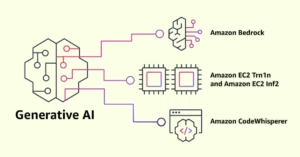
Generative AI on AWS and Its Practical Use Cases
Generative AI has changed how applications interact with users. AWS supports this shift by offering services that provide access to large language models and generative capabilities. These tools help developers build applications that can generate text, summarize content, answer questions, or assist users in real time.
For developers, generative AI on AWS is especially valuable because it integrates seamlessly with existing cloud systems. Whether building internal tools or customer-facing applications, generative AI allows AWS Developers to deliver smarter, more engaging experiences without managing model infrastructure.
Integrating AWS AI Tools into Real-World Applications
AI tools become powerful when they are part of real workflows. AWS enables developers to connect AI services with APIs, serverless functions, and databases. This allows AI to respond dynamically to user actions or system events.
For example, an application can analyze user input using AI, process results in real time, and store insights securely. This type of integration helps developers build intelligent systems that feel natural and responsive, rather than isolated AI features.
Improving Developer Productivity with AWS AI
AWS is also using AI to help developers work more efficiently. AI-powered assistants and smart recommendations reduce repetitive tasks and improve decision-making. These tools help developers write better infrastructure code, understand cloud services faster, and optimize system design.
For beginners, this support reduces the learning curve. For mid-level developers, it accelerates development speed and improves solution quality. AI becomes not just a feature, but a productivity partner in everyday development work.
How AWS AI Skills Impact Developer Careers
AI and cloud computing are converging into a single skill set that is highly valued in the job market. Employers want developers who can build scalable, intelligent applications. Learning AWS AI tools positions developers for roles in cloud engineering, AI development, and backend architecture.
Beginners gain access to modern roles earlier in their careers, while mid-level developers strengthen their profiles for leadership and advanced technical positions. AWS AI skills demonstrate adaptability, problem-solving ability, and future readiness.
Cost, Ethics, and Responsible AI Development
While AWS simplifies AI adoption, developers must still understand responsible usage. AI services are typically priced based on usage, making cost monitoring an important part of development. Efficient design helps avoid unnecessary expenses.
Ethical considerations are equally important. Developers must ensure data privacy, fairness, and transparency in AI-powered systems. AWS provides tools and best practices to support responsible AI development, but awareness and intent remain essential.
Final Thoughts: The Future for AWS Developers Using AI
AI is no longer an experimental technology—it is a fundamental part of modern software development. AWS is making AI accessible, scalable, and practical for developers at all levels. By learning and applying AWS AI tools, developers can build smarter applications and future-proof their careers.
For any AWS Developer, embracing AI is not just about learning new tools—it is about staying relevant in a rapidly evolving industry. Those who invest in these skills today will lead the next generation of intelligent cloud applications.
FAQs:
Q1: What are the best AWS AI tools for beginners?
A: Amazon Lex, Comprehend, Rekognition, and Polly are beginner-friendly and require minimal ML knowledge.
Q2: Do I need prior AI knowledge to use AWS AI services?
A: No. Pre-built services allow developers to integrate AI without deep knowledge of machine learning.
Q3: Can AWS AI tools handle large-scale applications?
A: Yes. AWS services scale automatically, so developers can focus on features instead of infrastructure.
Q4: What programming languages can I use with AWS AI tools?
A: Python, Java, Node.js, C#, and other languages supported by AWS SDKs.
Q5: How do I combine multiple AWS AI services in a project?
A: Use AWS Lambda, S3, and API Gateway to orchestrate multiple AI services in workflows.
Q6: How much do AWS AI services cost?
A: They follow a pay-as-you-go model. Costs vary by service usage, storage, and API calls.