
1. Introduction
Choosing the right type of mobile app is not just a development choice — it’s a business decision that affects almost everything that follows. The app type you choose determines your total investment, launch timeline, performance quality, user engagement, and how easily your app can scale as your business grows. One wrong choice can lead to slow performance, high maintenance costs, or an app that simply doesn’t meet user expectations.
Today, most businesses rely on one of these three approaches to build mobile apps:
- Native Apps — built specifically for iOS or Android
- Hybrid Apps — one codebase for multiple platforms
- PWAs (Progressive Web Apps) — web apps that behave like mobile apps
Each comes with its own advantages, limitations, and ideal use cases. Some offer the highest performance, while others reduce cost and development time. Some are perfect for heavy, feature-rich apps, while others are best for fast-loading, lightweight customer experiences.
This makes it crucial to align your app type with your business objectives, target users, required features, and long-term vision. When the technology matches the goal, you get a product that performs well, stays cost-efficient, and delivers consistent user value.
Whether you’re launching your first mobile app, improving an existing one, or planning a digital transformation, understanding these differences will help you make a confident, future-proof decision that supports your business for years to come.
2. What Is a Native App?
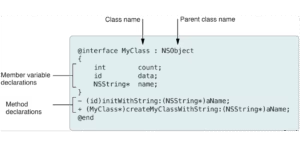
Native apps are mobile applications built exclusively for a single operating system — either iOS or Android. They use the official languages and tools recommended by each platform, such as:
- Swift or Objective-C for iOS
- Kotlin or Java for Android
Because these apps are created with platform-specific technologies, they can directly access device features like the camera, GPS, sensors, notifications, and hardware-level functions without limitations.
This results in unmatched speed, reliability, and smooth performance, making native apps the top choice for businesses that want the best possible user experience. Native apps also follow each platform’s design and security guidelines, which means users get a familiar, seamless, and highly stable app environment.
2.2 Key Features
Fastest Performance
Native apps run directly on the device’s operating system, which means no delays, no middleware, and no compatibility compromises. This makes them the fastest and most responsive option for mobile development.
Smooth, Fluid User Experience
Because native apps follow platform-specific design guidelines, animations, gestures, and transitions feel natural and seamless. This results in a user experience that feels premium and consistent across the entire app.
Full Access to Device Hardware
Native apps can use every hardware capability without restrictions, including:
- Camera & microphone
- GPS & location services
- Sensors (accelerometer, gyroscope, proximity, etc.)
- Bluetooth & NFC
- Biometric authentication (Face ID, Touch ID, fingerprint)
This makes them ideal for apps that require deep hardware integration.
Highest Level of Stability & Security
Native development environments receive regular updates, strict guidelines, and built-in security features from Apple and Google. This gives native apps stronger protection against vulnerabilities and ensures long-term stability.
2.3 When Native Apps Are Ideal
Choose native development when your app requires:
High-Speed Performance
For apps that must run smoothly under heavy load, native development ensures the fastest processing and rendering.
Advanced Animations & Complex UI
If your app includes rich visuals, custom interactions, or motion-heavy screens, native frameworks deliver the most fluid and polished experience.
Real-Time Response
For real-time data, live updates, instant feedback, or fast user actions, native apps provide the lowest latency.
Heavy Device Interaction
When your app relies on sensors, biometrics, camera modules, GPS tracking, or offline capabilities, native development offers direct hardware access with no limitations.
These needs are common in:
- High-performance gaming apps
- Fintech and payment apps
- AR/VR and graphics-intensive apps
- Enterprise-level and mission-critical applications
- Any product where speed, security, and user experience are top priorities
2.4 Pros & Cons
Pros
Best Performance
Native apps run directly on the device’s operating system, which means they process data faster, render screens more smoothly, and handle heavy tasks without lag. This makes them ideal for performance-driven products.
Superior UI/UX
Because native apps follow platform-specific design standards (Apple’s Human Interface Guidelines and Google’s Material Design), the interface feels natural, polished, and intuitive. This leads to higher user satisfaction and engagement.
Full Device Access
Native apps can tap into every hardware feature — including GPS, camera, Bluetooth, biometrics, sensors, background services, and secure storage. This level of integration is crucial for apps that rely on hardware-intensive functionality.
High Reliability
Native development environments are stable, heavily tested, and supported by Apple and Google directly. This results in fewer crashes, stronger security, and consistent app behavior over long periods of use.
Cons
Higher Development Cost
Building a native app requires platform-specific expertise, separate codebases, and more engineering time. This increases both initial development cost and long-term maintenance expenses.
Separate App for iOS & Android
Since each platform needs its own codebase, you essentially build two versions of the same app. This also means double testing, double updates, and double optimization.
Longer Development Timeline
More code, deeper integrations, and platform-specific requirements naturally extend the timeline. Native development delivers the best quality — but takes more time compared to hybrid or PWA solutions.
3. What Is a Hybrid App?
3.1 Definition
Hybrid apps are built using standard web technologies — HTML, CSS, and JavaScript — and then wrapped inside a mobile container that allows them to run like native apps on multiple platforms. Popular frameworks such as React Native, Ionic, and Flutter make this possible by converting web code into mobile-ready components.
The biggest advantage is that developers write one codebase, and it runs on both iOS and Android, significantly reducing time and cost without completely sacrificing the mobile app experience.
3.2 Key Features
Faster Development
Since the same code works across platforms, development time is reduced dramatically.
Cost-Efficient
Hybrid apps require fewer engineering hours and smaller teams, making them more budget-friendly than native apps.
One Codebase for All Platforms
Updates, bug fixes, and new features are rolled out once — and instantly applied to both iOS and Android.
Near-Native Look and Feel
Modern frameworks deliver UI components and interactions that closely mimic native apps, offering a balanced user experience at a lower cost.
3.3 When Hybrid Apps Are Ideal
Hybrid apps are a smart choice for businesses seeking a balanced mix of speed, quality, and affordability. They are ideal for:
- MVPs (Minimum Viable Products) needing quick validation
- Startups testing new ideas before investing heavily
- Mid-level apps that require a good user experience without native-level complexity
- Fast go-to-market launches, where timing is a priority
- Businesses with limited budgets but still requiring mobile presence on both platforms
If you want to build quickly and reach users on both platforms without a native-level investment, hybrid development is the most efficient route.
3.4 Pros & Cons
Pros
More Affordable
Lower development and maintenance costs thanks to the shared codebase.
Faster Delivery
Shorter development timelines, ideal for businesses that need rapid deployment and updates.
Easy Maintenance
Bug fixes and feature updates are applied once and reflected across platforms instantly.
Cross-Platform Reach
Your app becomes available on both iOS and Android without needing two separate builds.
Cons
Not as Fast as Native
While reliable, hybrid apps still rely on a bridge between the app and the device, which can add slight delays.
Dependent on Plugins for Hardware Features
For advanced hardware interactions, hybrid apps require third-party plugins — not always as stable or flexible as native access.
Occasional Performance Limitations
Apps with heavy animations, complex graphics, or real-time processing may not perform at native speed.
4. What Is a PWA (Progressive Web App)?
4.1 Definition
A Progressive Web App (PWA) is a modern type of application built using standard web technologies — HTML, CSS, and JavaScript — but designed to behave like a real mobile app.
It runs directly inside a mobile or desktop browser, meaning users don’t need to download anything from the App Store or Play Store.
PWAs combine the reach of the web with the experience of native apps — fast, responsive, capable of offline use, and installable with a single tap.
In short:
A PWA feels like an app, works like a website, and requires zero installation.
4.2 Key Features
Works Offline
PWAs use a technology called service workers, allowing users to access important content even without an internet connection. Perfect for places with poor connectivity.
Super-Fast Loading
PWAs cache assets and data locally, so pages load instantly — often faster than traditional mobile sites.
Extremely Light on Storage
Unlike native apps that may take 100–300MB, PWAs usually take less than 1MB.
Users love this because they never have to delete photos or apps to make space.
Installable from Browser
No app store approval. No downloads.
Users can click “Add to Home Screen” and the PWA works like a regular app.
Automatic Updates
PWAs update silently in the background — no version installs, no user effort.
4.3 When PWAs Are Ideal
PWAs are a smart choice for businesses that want broad reach without heavy investment. They work wonderfully for:
eCommerce Stores
Fast browsing, offline access, instant loading — all essential for conversions.
Content Platforms
Blogs, news portals, and media websites thrive with PWAs because users get quick access and offline reading.
SaaS Dashboards
PWAs offer app-like speed and cross-device access for dashboards, CRMs, analytics tools, etc.
Customer Portals
They allow secure login, smooth performance, and consistent experience on all devices.
Early-stage Startups
A PWA is cost-effective, easy to maintain, and perfect for validating ideas quickly without building full native apps.
If your priority is reach, speed, and affordability, a PWA is often the best choice.
4.4 Pros & Cons
Pros
Most Affordable Option
PWAs are significantly cheaper to build than native or hybrid apps because they don’t require separate versions for iOS and Android.
Zero Installation Required
Users can access your product instantly — no friction, no drop-offs.
Works Across All Devices
One build runs everywhere: phones, tablets, and desktops.
Low Maintenance
Updates are centralized — you ship once, and everyone gets the latest version automatically.
Cons
Limited Access to Device Hardware
PWAs cannot fully access every device feature like Bluetooth, fingerprint sensors, or advanced camera functions (depends on browser support).
No Presence on App Stores
Unless packaged separately, PWAs don’t appear on Google Play or Apple App Store — which may affect discoverability.
May Not Support Highly Advanced Features
Complex animations, heavy graphics, background services, or high-performance requirements are harder to achieve compared to native apps.
5. Side-by-Side Comparison: Native vs Hybrid vs PWA
| Feature | Native Apps | Hybrid Apps | PWAs |
|---|---|---|---|
| Speed & Performance | ⭐⭐⭐⭐⭐ Best | ⭐⭐⭐ Good | ⭐⭐ Moderate |
| User Experience | ⭐⭐⭐⭐⭐ Best | ⭐⭐⭐ Good | ⭐⭐ Basic–Good |
| Development Cost | High | Medium | Low |
| Maintenance Effort | High | Medium | Minimal |
| Time to Market | Slow | Fast | Very Fast |
| Scalability | Excellent | Good | Moderate |
This snapshot helps you quickly identify what aligns with your priorities.
6. Cost Comparison: Which Is More Affordable?
Choosing an app type changes the entire cost profile of your product: initial build, time-to-market, ongoing maintenance, and hidden operational costs. Below I break down cost drivers, typical team needs, timeline estimates, ongoing expenses, hidden costs, and a clear recommendation framework.
Native Apps (iOS + Android)
Teams: 2× Mobile Engineers (iOS + Android) or 1 iOS + 1 Android, backend engineer, designer, QA, PM.
Effort: effectively double mobile engineering work vs single-code solutions (plus platform-specific QA and QA cycles).
Hybrid (React Native / Flutter / Ionic)
Teams: 1–2 Cross-platform engineers, backend engineer, designer, QA, PM.
Effort: one codebase for UI/business logic; extra work for plugin/native bridges when hardware features required.
- PWAs
- Works everywhere without app store fees
- Minimal long-term expenses
- Lowest development cost
If you’re budget-conscious or testing a business idea, Hybrid or PWA is usually the best entry point.
7. Which App Type Fits Your Business?
Choose Native If…
Performance and speed are top priority
You need advanced device features
You’re building a complex enterprise or fintech app
Choose Hybrid If…
You want cross-platform reach
You need fast development
You’re building an MVP or mid-level app
Choose PWA If…
You want the lowest cost
You need fast-loading, browser-based access
You want a simple, scalable solution without app store dependency
8. Final Recommendation
There’s no “one-size-fits-all” solution in mobile app development. The right choice depends on your:
- Budget
- Timeline
- Target audience
- Feature complexity
- Long-term growth plans
If you’re unsure, consulting with experts helps avoid costly mistakes and ensures your app is built for long-term success.
9. CTA: Get Expert Guidance
Need help choosing between Native, Hybrid, or PWA for your business?
Our mobile app experts can analyze your goals, budget, and roadmap — and guide you toward the perfect development strategy.